Business Logic
How to model the commercial layer of pricing: margins, discounts, lead time multipliers, and safety floors.
How to model the commercial layer of pricing: margins, discounts, lead time multipliers, and safety floors.
Margins
Cost-plus markup
The simplest model: add a fixed percentage on top of cost.
const cost       = materialCost + machineCost + setupPerPart
const MARGIN     = 0.40   // 40% gross margin target
const salePrice  = round(cost / (1 - MARGIN), 2)
// Note: cost / (1 - margin) gives a gross margin of MARGIN on the sale price
// cost * (1 + margin) gives a markup — a smaller gross margin on sale
cost / (1 - 0.40) = cost * 1.667 - this is a 40% gross margin (margin as % of sale price).
cost * 1.40 is a 40% markup - only 28.6% gross margin. Use whichever matches how your business measures profit.
Safety floor
Always set a minimum price to protect against undercharging on tiny or simple parts:
const MIN_PRICE      = material.variables['minUnitPrice']  // e.g. 5.00
const calculatedPrice = round(cost / (1 - MARGIN), 2)
const unitPrice       = variable('unitPrice', Math.max(MIN_PRICE, calculatedPrice))
Min / max bounding
Floor and ceiling together - useful when your cost model is new and you want to avoid surprising outliers:
const MIN_PRICE = 5.00
const MAX_PRICE = 2000.00
const bounded   = Math.max(MIN_PRICE, Math.min(MAX_PRICE, calculatedPrice))
Quantity discounts
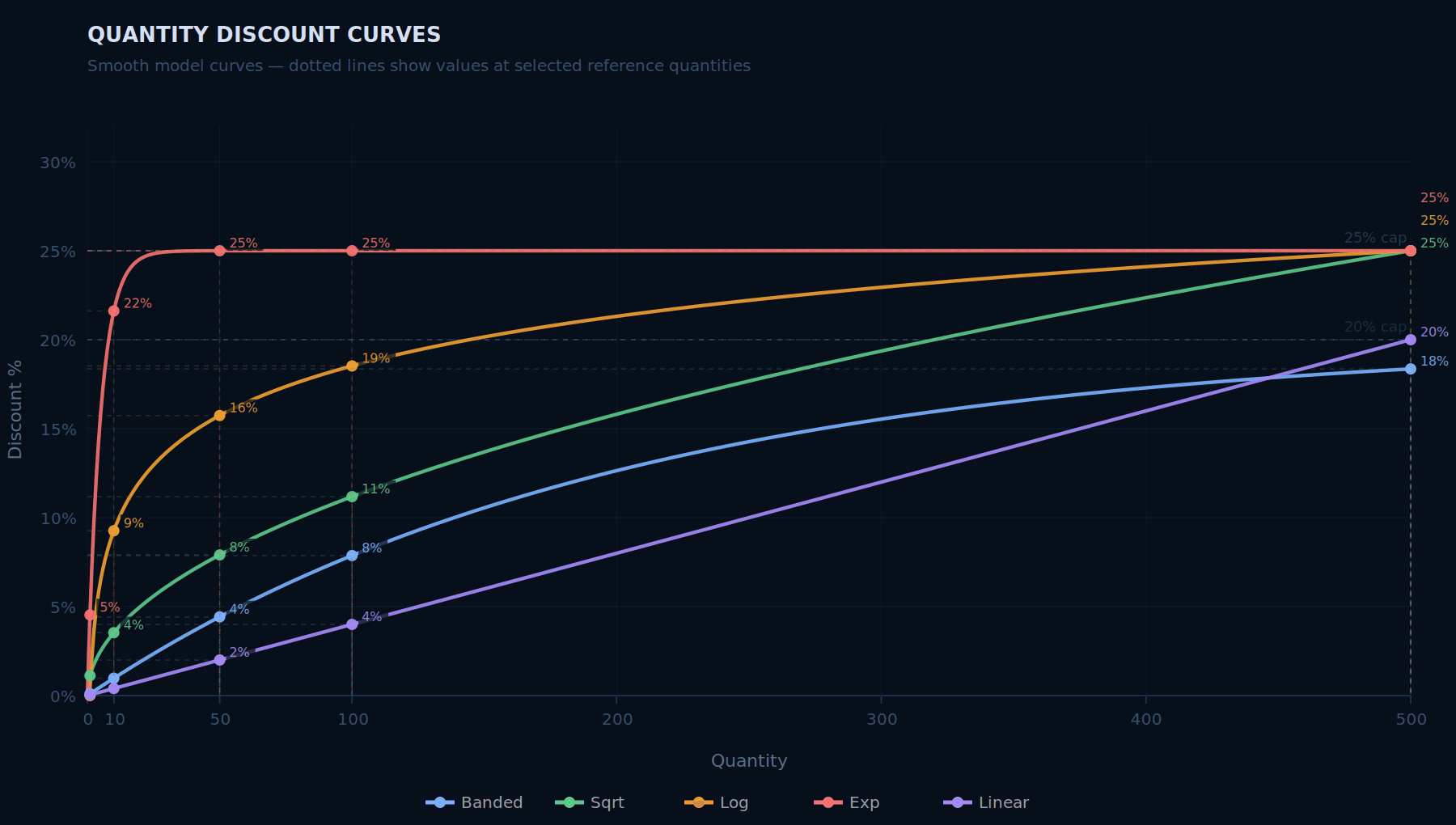
Five common curves, each with different behaviour. Choose based on your cost structure.
1. Banded (step function)
const getMultiplier = createBands({ 10: 0.95, 50: 0.90, 100: 0.85, 250: 0.80 }, 1.0)
const multiplier    = getMultiplier(quantity)
const unitPrice     = variable('unitPrice', round(baseCost * multiplier, 2))
Best for: processes where discount tiers are a selling point you can communicate clearly. "10% off at 50 units" is easy to explain.
Watch out for: cliff edges - a customer ordering 49 units pays noticeably more than one ordering 50. Some customers will game this.
2. Square root
const MAX_DISCOUNT = 0.25  // 25% maximum discount
const multiplier   = Math.max(1 - MAX_DISCOUNT, 1 / Math.sqrt(quantity / 5 + 1))
const unitPrice    = variable('unitPrice', round(baseCost * multiplier, 2))
Best for: processes with high per-job fixed costs (setup, programming). Discounts are aggressive at low quantities, then level off. Reflects real cost structure well for CNC, SLS, SLA.
3. Logarithmic
const MAX_DISCOUNT  = 0.30
const discountFrac  = Math.min(MAX_DISCOUNT, Math.log10(quantity + 1) * 0.15)
const multiplier    = 1 - discountFrac
const unitPrice     = variable('unitPrice', round(baseCost * multiplier, 2))
// qty 1: 0% discount. qty 10: ~15%. qty 100: ~30% (hits cap)
Best for: wide quantity ranges (1–10,000+). Smooth curve with a hard ceiling. Similar shape to square root but grows slightly faster at high quantities.
4. Exponential towards a ceiling
const MAX_DISCOUNT  = 0.25
const RATE          = 0.03  // controls how fast the ceiling is approached
const discountFrac  = MAX_DISCOUNT * (1 - Math.exp(-quantity * RATE))
const multiplier    = 1 - discountFrac
const unitPrice     = variable('unitPrice', round(baseCost * multiplier, 2))
// qty 1: ~3%. qty 50: ~22%. qty 100: ~25% (asymptotic)
Best for: when you want a guaranteed margin floor. The ceiling is hard - you can never exceed MAX_DISCOUNT no matter how large the order.
5. Linear with cap
const discountFrac  = Math.min(0.20, quantity * 0.002)  // 0.2% per unit, max 20%
const multiplier    = 1 - discountFrac
const unitPrice     = variable('unitPrice', round(baseCost * multiplier, 2))
Best for: simple, transparent pricing. Easiest to explain and audit. Use when you just want a gentle, proportional discount without complexity.
Comparison at key quantities
| Qty | Banded | Sqrt | Log | Exp | Linear |
|---|---|---|---|---|---|
| 1 | 0% | 0% | 0% | 3% | 0.2% |
| 10 | 5% | 13% | 15% | 26%→cap | 2% |
| 50 | 10% | 20% | 25%→cap | 25%→cap | 10% |
| 100 | 15% | 23% | 30%→cap | 25%→cap | 20%→cap |
| 500 | 20% | 25%→cap | 30%→cap | 25%→cap | 20%→cap |
Values based on the code examples above with their respective caps.
Customer-specific pricing
For key accounts or negotiated rates, use a lookup table keyed on customer.organisationName. Always lowercase the key - organisation names in Phasio can have inconsistent capitalisation and a case mismatch silently drops the discount:
const customerKey = (customer?.organisationName ?? '').toLowerCase()

const CUSTOMER_DISCOUNTS: Record<string, number> = {
  'acme corp':  0.15,   // 15% off
  'beta gmbh':  0.10,
  'gamma ltd':  0.20,
}

const customerDiscount = CUSTOMER_DISCOUNTS[customerKey] ?? 0
const unitPrice        = variable('unitPrice', round(baseCost * (1 - customerDiscount), 2))
This is a silent discount. The reduced price appears as the regular unit price - there is no separate discount line item visible to the customer. Use this when a negotiated rate should not be surfaced on the quote.
Customer-specific material rates
Some customers have a negotiated rate on a specific material but not others. Override the material cost directly rather than applying a blanket percentage:
const customerKey  = (customer?.organisationName ?? '').toLowerCase()
const materialName = specification.material.name

// Negotiated costPerCm3 per customer per material. Falls back to material variable.
const CUSTOMER_MATERIAL_RATES: Record<string, Record<string, number>> = {
  'acme corp': { 'PA12': 0.14, 'TPU': 0.18 },
  'beta gmbh': { 'PA12': 0.16 },
}

const defaultRate    = material.variables['costPerCm3']
const customerRates  = CUSTOMER_MATERIAL_RATES[customerKey] ?? {}
const effectiveRate  = customerRates[materialName] ?? defaultRate

const volumeCm3  = shrinkWrapVolume / 1000
const unitPrice  = variable('unitPrice', round(volumeCm3 * effectiveRate + setupCost, 2))
Customers outside the lookup table pay the standard rate automatically.
Customer-specific post-process rates (Level 2)
If a customer runs high volumes of a particular post-process, they may have a negotiated unit rate for that operation. Apply it at Level 2 using the same pattern:
// Level 2 equation — e.g. dyeing
const customerKey = (customer?.organisationName ?? '').toLowerCase()

const CUSTOMER_RATES: Record<string, number> = {
  'acme corp': 3.00,   // negotiated rate per part
  'beta gmbh': 4.50,
}

const DEFAULT_RATE = 6.00
const ratePerPart  = CUSTOMER_RATES[customerKey] ?? DEFAULT_RATE
const unitPrice    = variable('unitPrice', round(ratePerPart, 2))
done(unitPrice)
Again, the customer sees only the lower price - not a discount line.
Combining with a quantity discount: apply both, then take the larger:
const qtyMultiplier      = getMultiplier(quantity)
const customerMultiplier = 1 - customerDiscount
const finalMultiplier    = Math.min(qtyMultiplier, customerMultiplier)  // lower = bigger discount
const unitPrice          = variable('unitPrice', round(baseCost * finalMultiplier, 2))
Or apply them sequentially (compounded):
const unitPrice = variable('unitPrice', round(baseCost * qtyMultiplier * customerMultiplier, 2))
// e.g. -10% qty + -15% customer = -23.5% combined
Lead time pricing
Lead times in Phasio are workspace-level settings. Read the customer's chosen tier via requisition.leadTime.name.
const LEAD_TIME_MULTIPLIERS: Record<string, number> = {
  'Economy':   0.85,   // 15% cheaper — slower
  'Standard':  1.00,
  'Express':   1.25,   // 25% surcharge
  'Overnight': 1.60,
}

const leadTimeMultiplier = LEAD_TIME_MULTIPLIERS[requisition.leadTime.name] ?? 1.0
const unitPrice = variable('unitPrice', round(baseCost * leadTimeMultiplier, 2))
For high-quantity orders, you may want to reduce the surcharge - rush pricing makes more sense for small batches:
const RUSH_SURCHARGE = LEAD_TIME_MULTIPLIERS[requisition.leadTime.name] ?? 1.0
// Taper the surcharge at high quantities: full surcharge at qty=1, 50% of surcharge at qty=50+
const taperFactor = Math.max(0.5, 1 - (quantity - 1) * 0.01)
const adjustedMultiplier = 1 + (RUSH_SURCHARGE - 1) * taperFactor
const unitPrice = variable('unitPrice', round(baseCost * adjustedMultiplier, 2))
Combining multiple adjustments
When stacking margins, discounts, and surcharges, apply them in a consistent order:
// 1. Base cost (material + machine + setup)
const baseCost = materialCost + machineCost + setupPerPart

// 2. Apply margin
const priceBeforeDiscounts = round(baseCost / (1 - MARGIN), 2)

// 3. Apply quantity discount
const qtyMultiplier = getQtyDiscount(quantity)

// 4. Apply lead time multiplier
const leadMultiplier = LEAD_TIME_MULTIPLIERS[requisition.leadTime.name] ?? 1.0

// 5. Apply customer discount
const custDiscount = CUSTOMER_DISCOUNTS[customer.organisationName ?? ''] ?? 0

// 6. Combine and floor
const calculated = round(
  priceBeforeDiscounts * qtyMultiplier * leadMultiplier * (1 - custDiscount),
  2
)
const unitPrice = variable('unitPrice', Math.max(MIN_PRICE, calculated))
This order ensures: margin is always on cost, discounts compound, lead time applies after discounts, and the floor is the final safety net.
Last updated on
Reading TypeScript
A 5-minute primer on reading the TypeScript used in pricing equations - enough to understand what an equation does and tweak the numbers.
Level 1 - Process Deep Dives
Full pricing implementations per manufacturing process - why each is unique, core methodology, a numerical example, the complete algorithm, and when to use it.