Workflow example: Powder bed printing
A concrete end-to-end example of a six-step powder bed 3D printing workflow, from nesting queue through final post-processing and completion.
In this example, we demonstrate how to implement a simple powder bed 3D printing workflow using operations in Phasio. The workflow covers the entire production process from initial part queuing through final post-processing and quality control, providing a practical reference for manufacturers setting up similar production workflows.
Powder bed 3D printing workflow structure
This implementation creates a six-step workflow that efficiently manages powder bed printing operations while maintaining clear visibility and control over each production stage.
Workflow sequence
The example workflow consists of six sequential operations:
- Waiting for Nesting: Initial backlog management.
- Printing: Active production with build preparation.
- Post-Printing: Essential post-production processes (cooling, depowdering, etc.)
- Black Dye: Optional finishing operations.
- Quality Control: Final inspection and validation.
- Completed: Workflow completion and order fulfillment.
Operation configuration
| Operation Name | Sequence | Group Name Prefix | Step Type | Build Constraint | Step Naming Strategy | View Type | Final Station |
|---|---|---|---|---|---|---|---|
| Waiting for Nesting | 0 | Waiting | Base | None | Always Rename | Part | False |
| Printing | 1 | Build | Upload 3MF | Material | Always Rename | Group | False |
| Post-Printing | 2 | Batch | Base | Material | Inherit from Previous Step | Group | False |
| Black Dye | 3 | Dye-Batch | Base | Material & Color | Inherit from Previous Step | Group | False |
| Quality Control | 4 | QC-Batch | Quality Control | None | Inherit from Previous Step | Part | False |
| Completed | 5 | Finished | Base | None | Always Rename | Part | True |
Operation details
Waiting for Nesting
This operation holds the backlog of parts that have been scheduled for production.
- Uses the Base step type — parts must be progressed manually.
- Parts wait here until they are ready to move to Printing.
Printing
When parts enter this operation, the Upload 3MF step type allows manufacturers to work with parts of the same material type.
- In the Build view type, these parts appear as consolidated builds.
Post-Printing
Parts entering this operation are grouped by material constraints to ensure efficient processing. The Inherit from Previous Step naming strategy keeps the group name when the moved set's composition is unchanged; a partial split mints a new groupId under the old prefix. This ensures consistent build identification through essential post-production steps such as cooling and sandblasting.
Black Dye
An optional finishing operation where parts are grouped by both material and color constraints to ensure consistent dye treatment. The Inherit from Previous Step naming strategy keeps group names from previous stages when composition is unchanged; a partial split mints a new groupId under the old prefix.
Quality Control
This operation has no grouping constraints. The Inherit from Previous Step naming strategy maintains traceability: when composition is unchanged the group name carries through; a partial split mints a new groupId under the old prefix.
Completed
The final stage of the workflow.
- Parts arriving here are automatically renamed with a "Finished" prefix using the Always Rename naming strategy.
- This operation is designated as the final station (where Final Station = True), marking the completion of the production workflow.
- As parts reach this stage, the order's completion rate progresses toward 100%. Once all parts in an order are finished, they are automatically removed from the Completed operation.
- This station can be used to indicate open boxes or staging areas until the entire order is prepared for shipment.
Workflow operation
Part progression and filtering
When advancing parts from one operation to the next, manufacturers can apply filters to optimize build preparation and workflow efficiency. Filters include maximum volume, customer orders, due dates, and destination operations. This functionality is especially useful for grouping parts that share identical post-processing workflows, supporting efficient planning and resource allocation.
Part progression flow
- From the order's Production tab, use Create work orders to schedule parts into production. Each part enters the workflow at Waiting for Nesting once its work order is created.
- Production teams download parts grouped by material from the Printing operation.
- Build preparation is completed offline using nesting software.
- 3MF upload advances the entire nested build into the Printing operation as a group.
- On the build screen, stage parts per destination, assign a name to the outgoing build, and hit Progress to commit the move without leaving the page.
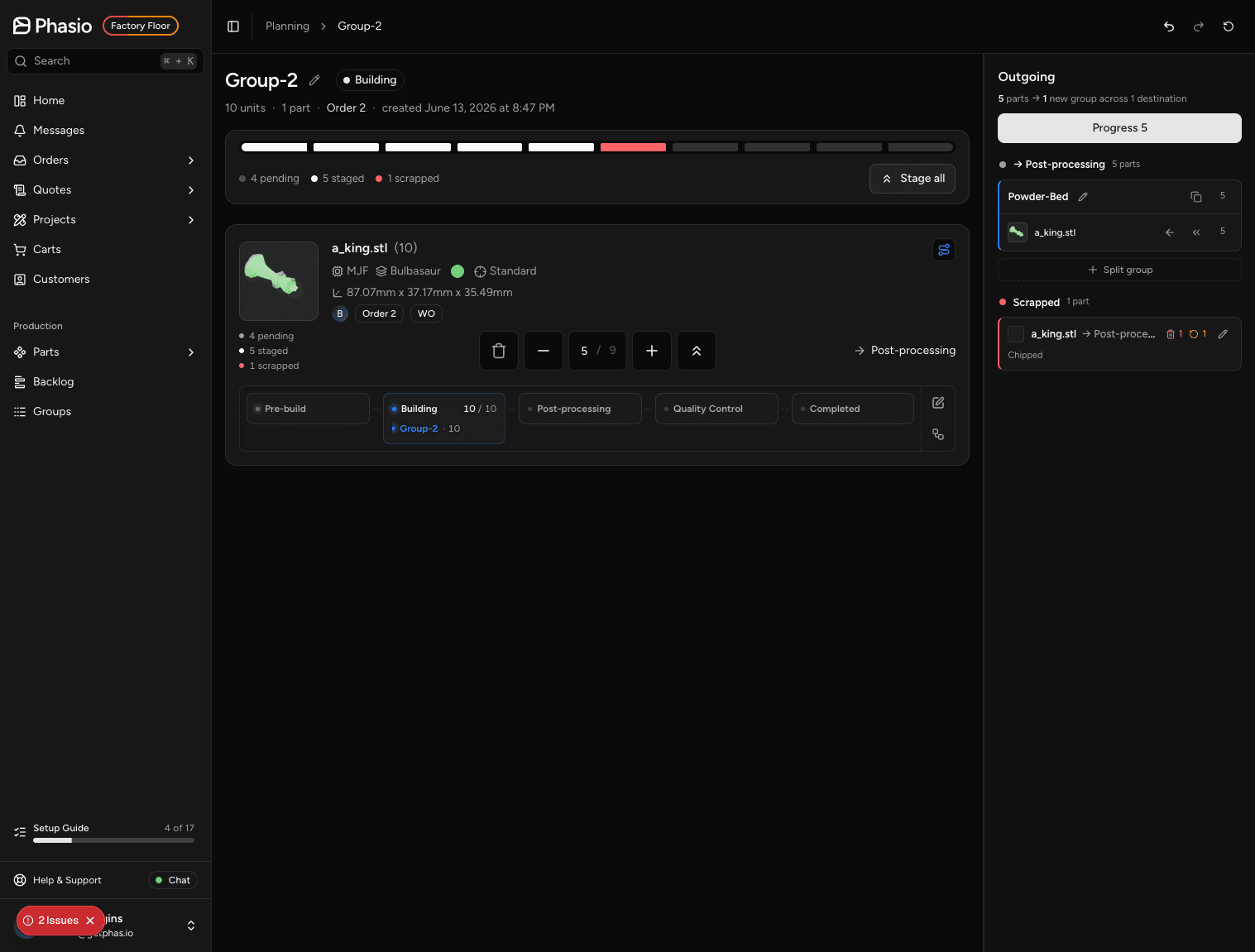
- Repeat for each subsequent operation — Post-Printing, Black Dye (if applicable), and Quality Control — using the same build screen flow.
⚠️ At any operation you can scrap individual parts from the build screen and optionally queue a replacement quantity — the replacement tops up the existing work order at the first operation.
Workflow efficiency benefits
This example illustrates how operation configuration can significantly improve production efficiency while preserving the flexibility to meet diverse manufacturing needs and optional processing steps. Some advantages include:
- Material-based grouping minimizes error rates and reduces setup time.
- Batch processing via 3MF uploads streamlines high-volume production and simplifies build preparation.
- Flexible routing supports various customer requirements and custom workflows.
- Enables real-time tracking and visibility into part operations throughout the workflow.
Last updated on