What's new in Phasio
New features, improvements, and fixes - shipped regularly.
Label Your Quotes
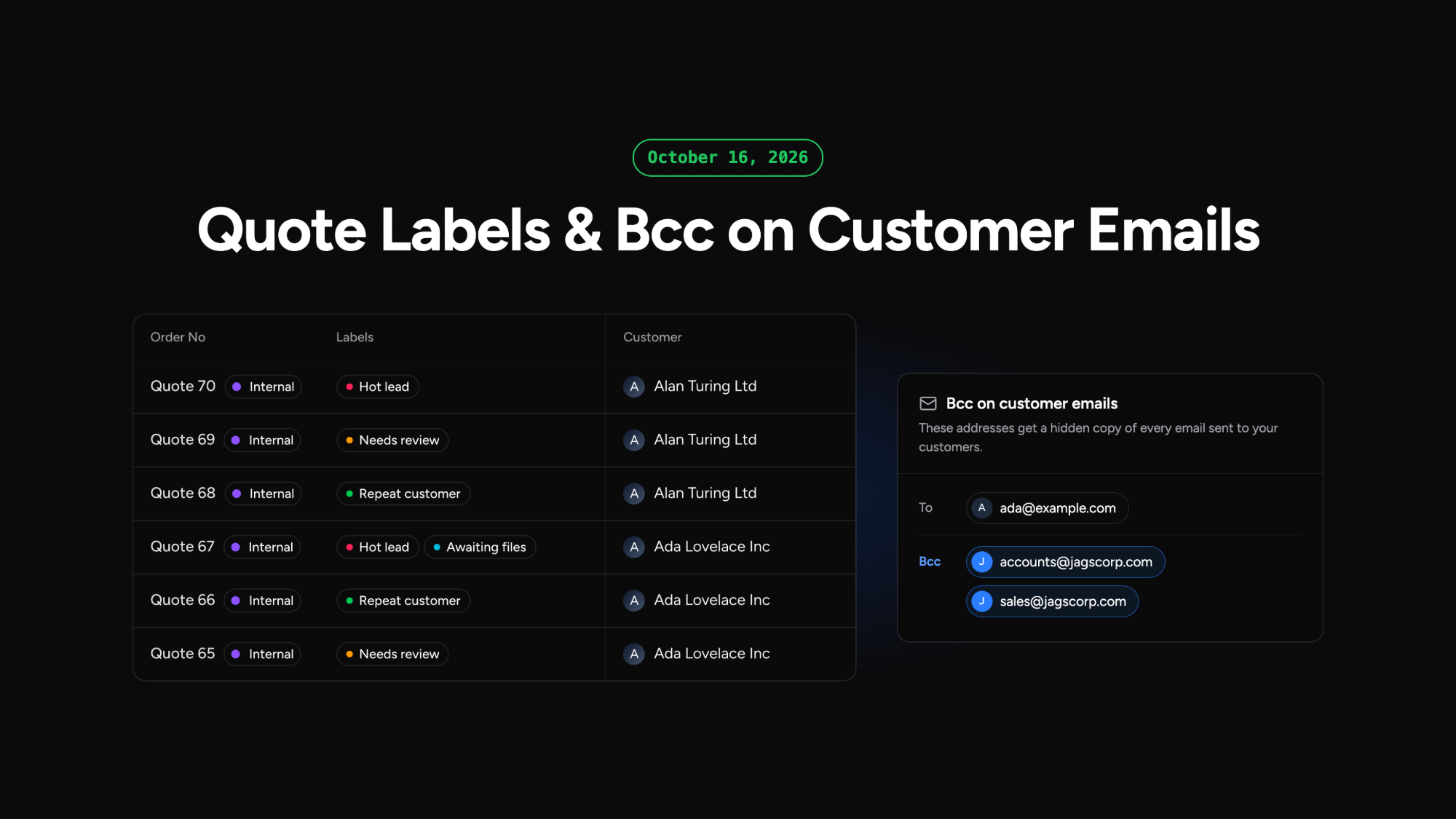
You can now create your own labels and attach them to quotes, so your team can see at a glance where each quote stands. Labels are set up under Settings in Workspace Labels, each with a name and a colour. On the Quotes page, the new Labels column lets you add or create labels in place, and filter and sort the list by them. Labels stay on a quote when it becomes an order, and customers never see them. The Awaiting status column is removed, as it showed "Take action" on every quote.
Bcc on Customer Emails
You can now receive a hidden copy of every email Phasio sends to your customers. Add up to five addresses in Bcc on customer emails, under Settings in Workspace General. Colleagues without a Phasio seat can see what customers were sent, and an accounting mailbox receives invoices without anyone forwarding them.
Open Carts on the Customer Page
A customer's page now has a Carts tab that lists their open carts, so you can see what they are working on without searching the Carts page.
Book Internal Orders to Cost Centres
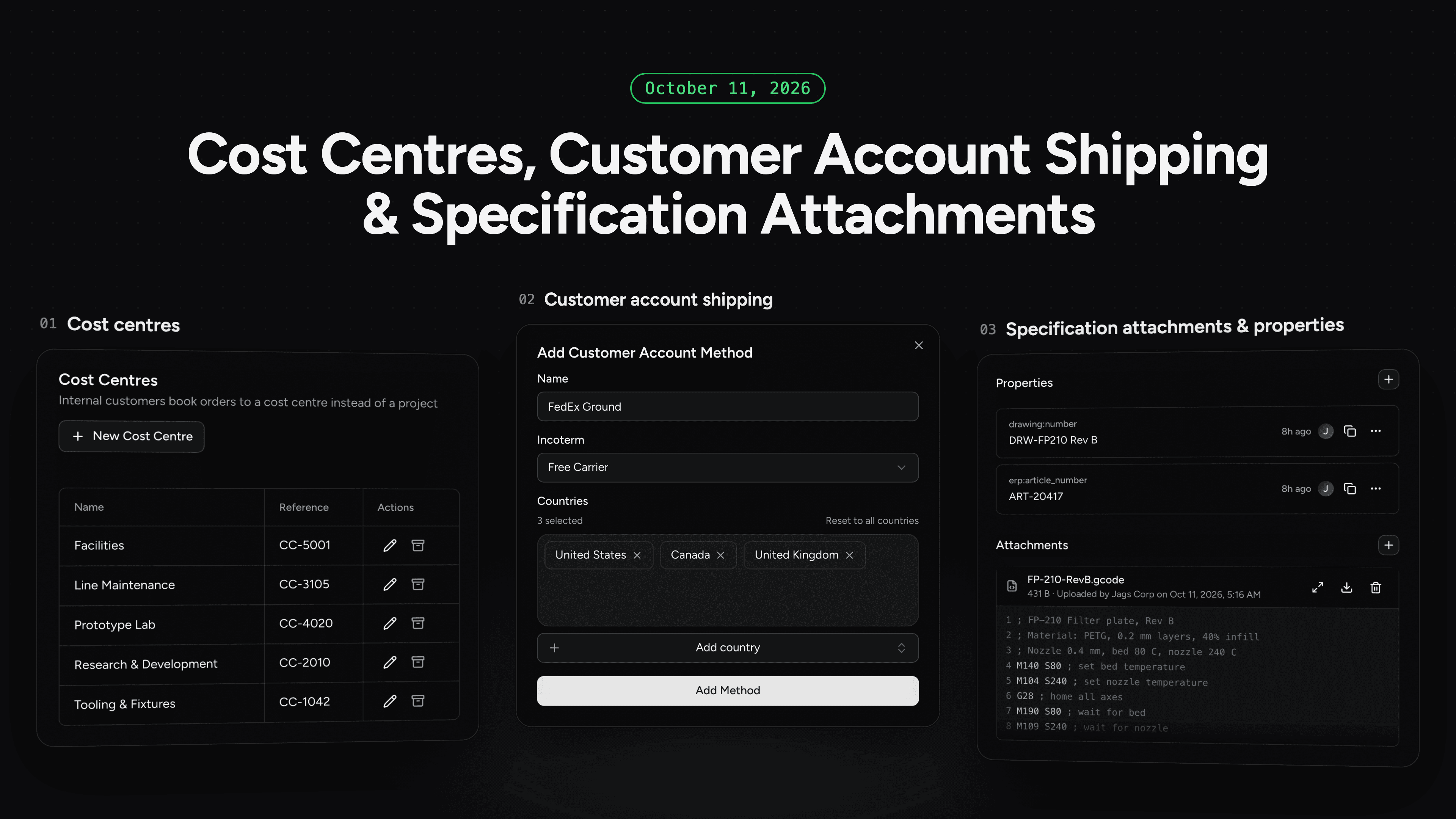
Internal customers can now book an order to a cost centre instead of a project. Manufacturers create cost centres under Settings in Finances, each with a name and a free-text reference, and internal customers pick one at checkout from the same searchable list as their projects. An order is booked to a project or a cost centre, never both, and its cost centre shows on the order page, in the orders list with its own filter, and in the order export. Archived cost centres drop out of checkout but stay on the orders already booked to them.
Ship on Your Customer's Carrier Account
Orders can now ship on the customer's own carrier account. Manufacturers set up customer account shipping methods such as FedEx Ground under Settings in Shipping, optionally limited to certain destination countries and with a default incoterm. At checkout the customer enters their account number and delivery address and is not charged for shipping. The incoterm carries through to the order, so it is clear who covers insurance, export clearance and import duties.
Attachments and Properties on Part Specifications
On the Pro plan, part specifications can now hold their own files and data. On a part specification page, manufacturers can upload files of up to 25 MB, preview images and text files such as G-code in place, and see who uploaded each file and when. A new Properties section stores your own key and value pairs, such as an ERP article number, and the same properties can be read and written through the Manufacturer API. Production files and integration identifiers stay with the specification they belong to instead of in separate folders and spreadsheets.
Label Part Revisions Your Way
Phasio numbers part revisions Rev 1, Rev 2, Rev 3, but that is rarely how you refer to them. You can now give any part revision your own label, so you decide what a revision is called. Use it to match your customer's revision, for example Rev F when they never sent the in-between revisions, or to tell a Prototype revision from a Production one. Labels are free text and appear on the part revisions page next to Phasio's revision number.
Accounting Contacts and Customers Stay in Step
Customers and contacts now stay closer to what is in your accounting system. A customer's language is picked up from the accounting system, and you can add an optional company name just for accounting sync, which helps when several customers share the same name in the external accounting system. Adding a contact in Phasio now updates the external accounting system too, and operators can set their own default language.
CNC Machining Analysis and Pricing
CNC machining analysis now goes beyond basic geometry. Supported files are checked for holes, pockets, tooling constraints, setup estimates, and areas needing finishing work. The results are shown in part viewers, so quoting and engineering review the same manufacturing detail, and the new machining values are available in custom pricing equations for pricing setups, tooling, and finishing more accurately.
Attach Pictures and Documents to Shipments
Shipments can now carry their own files. Manufacturers can attach pictures and documents to a shipment, preview them in place, download them when needed, and remove them when they no longer apply. Delivery evidence and paperwork stay with the shipment instead of scattered across tools.
A New Optional Production Backlog
A new optional production backlog is available for teams that want a more hands-on way to triage and progress production work. It adds filtering and grouping for finding work quickly, lets manufacturers move and scrap parts directly from the backlog, and prepares builds from uploaded bills of parts.
Split Orders Across Multiple Shipments
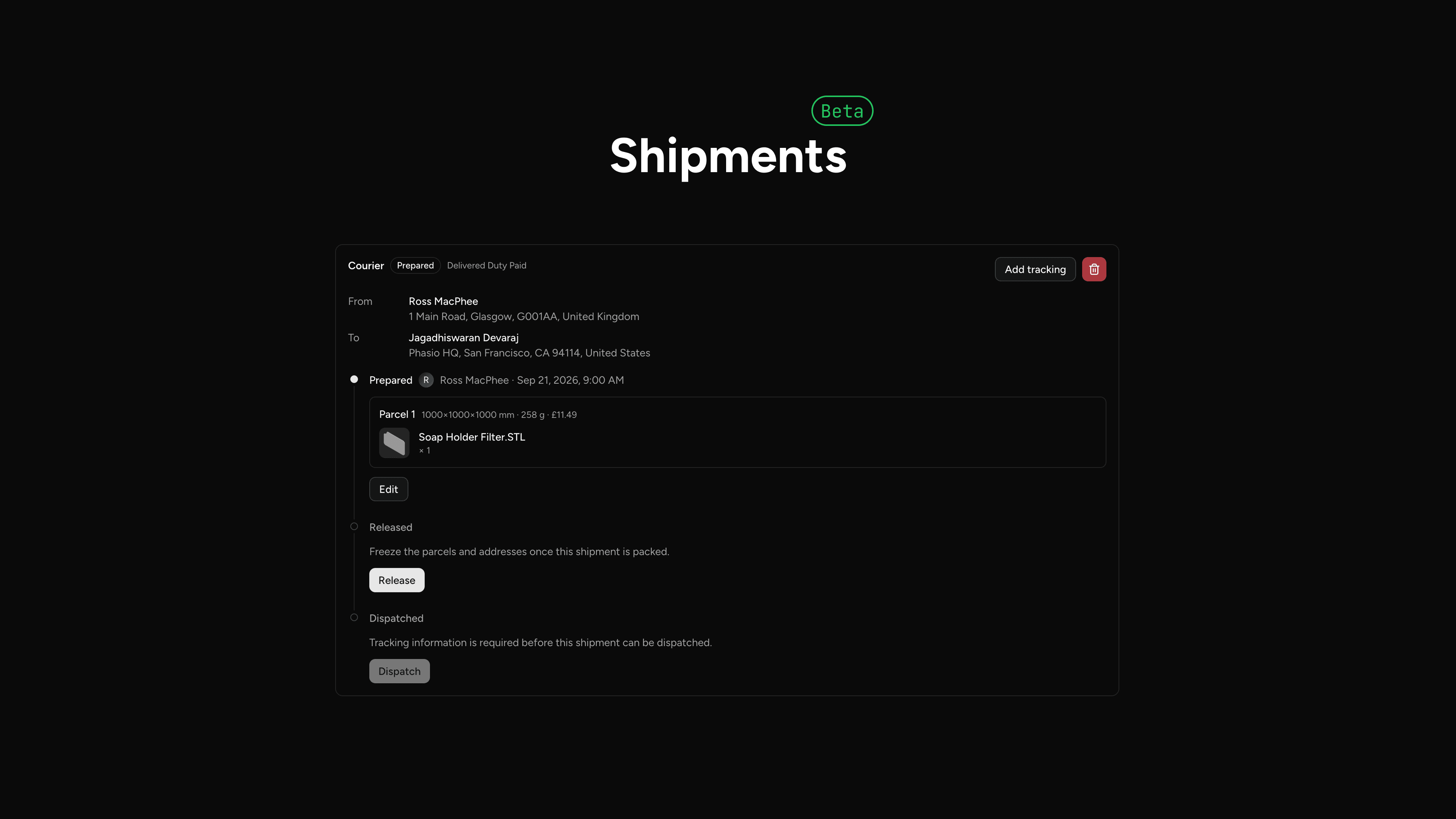
Manufacturers can now split an order into multiple courier or collection shipments, each with its own parcels, tracking, addresses, and Incoterms. Shipments move from Prepared to Released to Fulfilled, so part of an order can be dispatched or marked ready for collection while the rest stays in production. Facility addresses are managed under Settings in Workspace Addresses with a single default ship-from site, and customers see fulfilled shipments with tracking on the order. Shipments are currently in beta and can be switched on in Beta Features under Settings.
Merge Duplicate Customer Organisations
Customer organisation merge is back, rebuilt for clearing up duplicates. It usually happens when a contact registers themselves while their company already exists in the system, leaving manufacturers with the same customer twice - this merges one organisation into another from the customer list. Every contact from the duplicate moves to the surviving organisation, keeping their email address and sign-in, while the duplicate disappears from the list. Past orders and quotes stay on the original record and do not move across, so the merge fits duplicates rather than reorganisations.
Archive Operations Without Breaking Production
Archiving a manufacturing operation now automatically deprecates its production routings, so existing orders and workflows keep working. The backlog only shows an archived operation when incomplete work orders still route through it, and archived operations can no longer be selected for new on-demand routing. This stops a deleted operation from corrupting production data, which previously needed manual repair.

AI-Assisted Pricing Equations
AI assistants connected to Phasio through the Model Context Protocol (MCP) can now help create and refine TypeScript pricing equations for processes, post-processing, and order-level adjustments. New equations are saved as non-live versions. process and post-processing versions can be tested against real parts and compared with live prices before a manufacturer reviews and activates the chosen version in Phasio.
Sign In with Social Providers
Manufacturers can now use social providers to create an account or sign in to Phasio, providing a faster alternative to email and password. Sign in with Google is available now, with Microsoft arriving soon.
Set a Default Shipping Method
Manufacturers can now choose which shipping method is preselected at checkout, so customers who click straight through no longer default to self-collection.
Specify Incoterms on Shipments
Shipments can now carry an agreed Incoterm, giving manufacturers and customers a documented basis for who is responsible for freight, insurance, and customs at each stage of delivery.
Find Parts Faster in the Storefront Catalogue
The storefront catalogue now supports full search, filtering, and sorting, so customers can move straight to the part they need even in large catalogues. Manufacturers have more control over what customers see: catalogue items can be unlisted individually or managed in bulk with multi-select, and each item now surfaces its manufacturing technology in the catalogue view.
Place and Track Internal Orders
Manufacturers can now raise internal orders through a dedicated internal checkout. An order can be tied to an internal customer type and booked against a project, with the project reference captured at checkout and carried through to order exports. This gives production and finance teams a clean record of internal work alongside customer demand.
Shipping Method Flows Through Every Document
The chosen shipping method now propagates automatically to generated documents and notifications and is available as a document template variable, so delivery terms stay consistent from quote to dispatch.
In preparation for a dedicated shipping module, the shipment concept has been renamed to shipping across the Manufacturer API and platform, and shipment is now deprecated. The existing shipment endpoints and fields still respond during the deprecation window; integrations should move to the shipping equivalents (for example order.shipment becomes order.shipping, and dispatchDate becomes expectedDispatchDate). Full field and endpoint mappings are in the developer documentation.
Connect AI Assistants to Your Phasio Data
Manufacturers can now connect an AI assistant to their Phasio account over the Model Context Protocol (MCP). Connections are authenticated and session-bound and persist across browser sign-ins, so a connector configured once in Claude, ChatGPT, or another MCP-capable client keeps working.
The assistant gets a read-only view of the manufacturer's configuration, covering pricing, shipping, taxes, documents, workflows, and customer-specific pricing, along with checks that flag incomplete or conflicting setup that could block quoting, checkout, or production. Access is scoped to the current manufacturer only.
Private Internal Conversations on Orders
Teams can now hold internal conversations directly on an order without those messages being visible to the customer, keeping production notes and internal context in one place instead of scattered across email and chat.
Sheet Metal Analysis and Pricing
Supported sheet metal CAD files can now be analysed for bend count, material thickness, flat blank area, and bend geometry. Manufacturers can enable bending for individual processes, review detected bends in the model viewer, and use the new sheet metal values in pricing equations.
Plan and Review Production Work
Work orders can now include planned start and due dates, giving production teams clearer scheduling information in the backlog. Nesting imports retain part placement and rotation data so saved layouts can be reviewed in 3D, and eligible production steps can be reversed when parts need to return to an earlier stage.
Purchase Orders for Direct Orders
Manufacturers can require a purchase order when creating a direct order, capture the reference during checkout, or explicitly continue without one when their workflow permits it. Direct-order conversions also notify connected systems through the standard conversion webhook.
Customer-Controlled Quote Line Removal
Manufacturers can choose to let customers remove eligible line items from an open quote. The quote is repriced after each removal, the manufacturer is notified, and safeguards keep at least one line item in the quote while protecting assembly relationships.
More Control Over Organisation Access
Users with access to multiple manufacturer organisations are now prompted to select the organisation they want to enter. Organisation consent and token refresh handling have been improved, and API keys can now be created with no expiry or with a configurable expiry between 24 hours and one year.
A More Reliable Sign-In Experience
Authentication across the manufacturer app and customer storefront has been upgraded. Sign-in, password reset, logout, and OAuth redirects now recover more reliably, while clearer handling is provided for unapproved accounts and unexpected login errors. Authentication emails can also use each manufacturer's branding and language.
Reuse Parts Across Quotes and Catalogues
Manufacturers can duplicate parts while preparing a quote, then add completed order parts to the customer catalogue without recreating their specifications. Quote edits now retain the existing part identity, comments, and files instead of duplicating or losing activity.
Editable Traveller Templates
Default order and group traveller templates can now be edited and selected alongside alternative templates, giving manufacturers more control over the documents used on the shop floor.
Customer Payments After Order Conversion
Customers can complete an online payment after a quote has been converted into an unpaid order. Payment status, terminal, Stripe confirmation, invoice, and purchase order flows now present the available action more consistently.
More Native CAD Formats
Parasolid and SolidWorks part files can now be uploaded for analysis, expanding the native CAD formats accepted by the platform.
Billing Address Validation at Checkout
Customers can no longer submit a saved quote without a valid billing address. Checkout now highlights the missing information before payment, avoiding orders that cannot be invoiced correctly.
Confirmed Order Edits Stay in Sync with Odoo
Edits to confirmed orders now update Odoo more reliably. Saved order changes are preserved even when the external synchronisation fails, and confirmed pricing updates use the order's latest supported line structure.
Clearer Production Actions
The Stage all action now reports every part that could not be staged instead of silently stopping at the first failure. Applying a library part specification also replaces the saved specification as expected, including its configured post-processing defaults.
Analyse CAD Files up to 1,000 MB
The CAD analysis pipeline now accepts files up to 1,000 MB and allows nearly ten minutes for complex jobs to complete. The manufacturer app and storefront no longer stop an upload because of a shorter fixed browser timeout.
Faster, Bounded Mesh Repair
Mesh repair now exits unsuccessful repair paths earlier and uses a bounded processing deadline, reducing wasted processing time on heavily damaged models. Geometry analysis also includes improved chordal and angular deviation handling and more accurate volume calculations.
Put Order Parts in the Right Sequence
Manufacturers can now drag parts into the required order while creating or editing an order. That sequence is saved and used consistently in order screens, the customer storefront, generated documents, and production traveller sheets.
Colour-Code Order Statuses
Order statuses can now have their own colours. The selected colours appear on the orders board and calendar, making priority, production stage, and exception states easier to recognise at a glance.
More Reliable Accounting Updates
Manual price overrides on confirmed orders are now sent to Odoo, including post-processing values. Odoo document generation uses fewer requests and handles longer generation times more reliably, while Comatic tax synchronisation and QuickBooks invoice refresh behaviour have also been improved.
More Manufacturing Technologies
Sheet-based jetting (SBJ) and fused granulate fabrication (FGF) are now available as manufacturing technologies when configuring processes.
A Redesigned Analytics Dashboard
The manufacturer analytics dashboard is now organised into focused Overview, Finance, Customers, Materials, and Production tabs. New period comparisons, clearer stat cards, currency selection, and separate inbound and outbound conversion funnels make it easier to understand how storefront carts and direct quotes become completed orders.
Conversion rates and funnel timings now use cleaner cohorts and historical audit data, so later order edits no longer rewrite earlier journey timings. Materials analytics is available on Pro plans, while Production analytics is available with Factory Floor.
Export Orders and Customers to Excel
Orders and customer organisations can now be exported directly to XLSX. Choose the date range, status filters, source, and columns to include, then review the estimated row count before downloading the workbook.
Order Calendar and Scalable Production History
The new order calendar provides a date-based view of scheduled and dispatched work. Completed production columns now load in smaller windows with a Load more action, keeping the production board responsive for manufacturers with a long order history.
Smarter Platform Assistance and Part Analysis
The AI assistant gained purpose-built tools for quoting, price explanations, part inspection, similar-part search, production history, and grouped order analytics. Part-photo detection and segmentation were also upgraded to improve the separation and matching of touching parts.
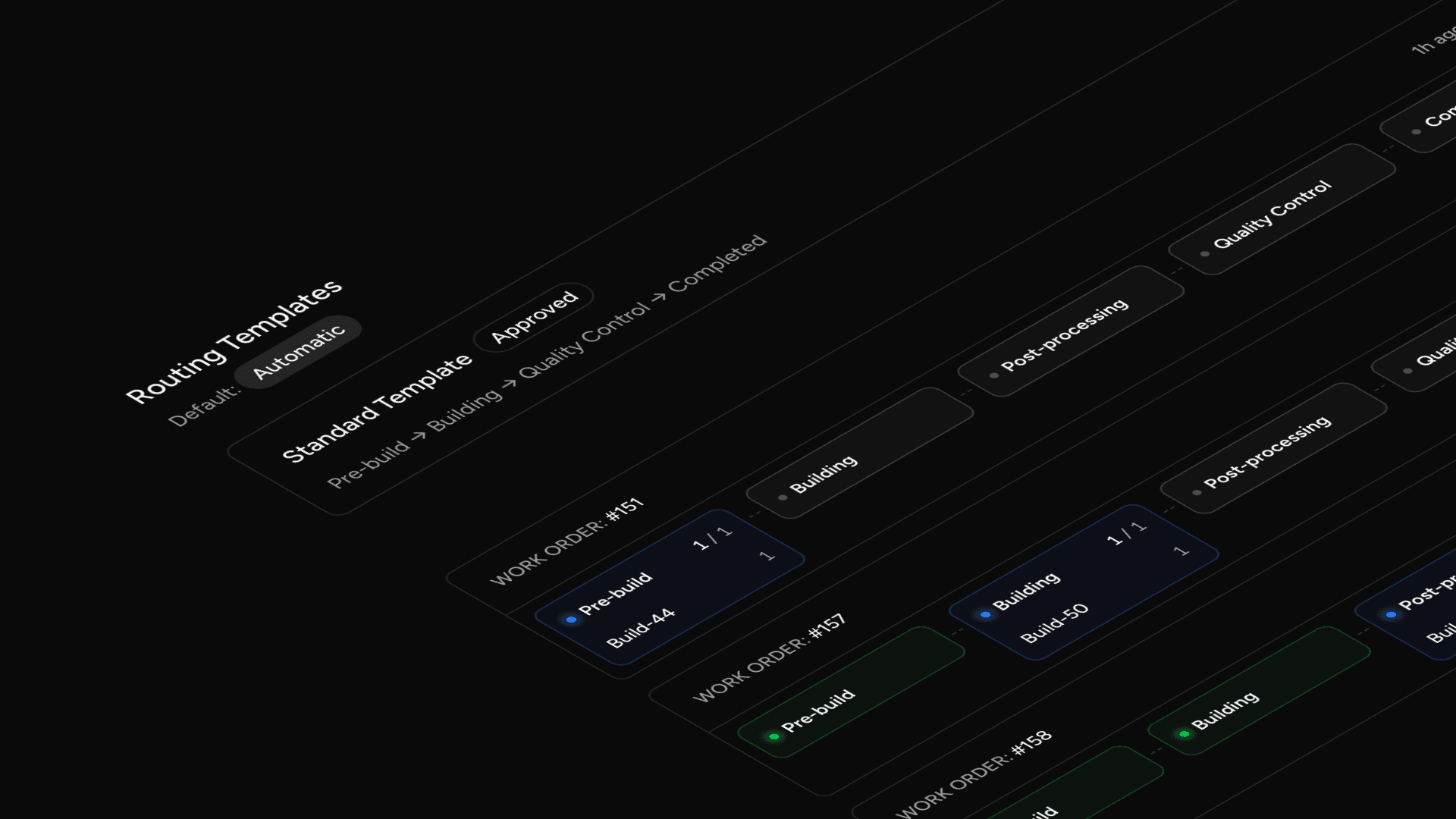
Production Routing & Flexible Work Orders
You can now give every part its own path through the shop. Save a reusable, multi-step routing on a part specification, then reuse it across orders. Each routing can be created, edited, approved, set as the default, and retired or replaced when your process changes.
You can split an order's production into several independent work orders, and adjust the routing on each one even after it has started. The build screen has been redesigned to match: mark parts as progressed or scrapped, upload nesting files, and arrange routing steps with drag-and-drop lanes.
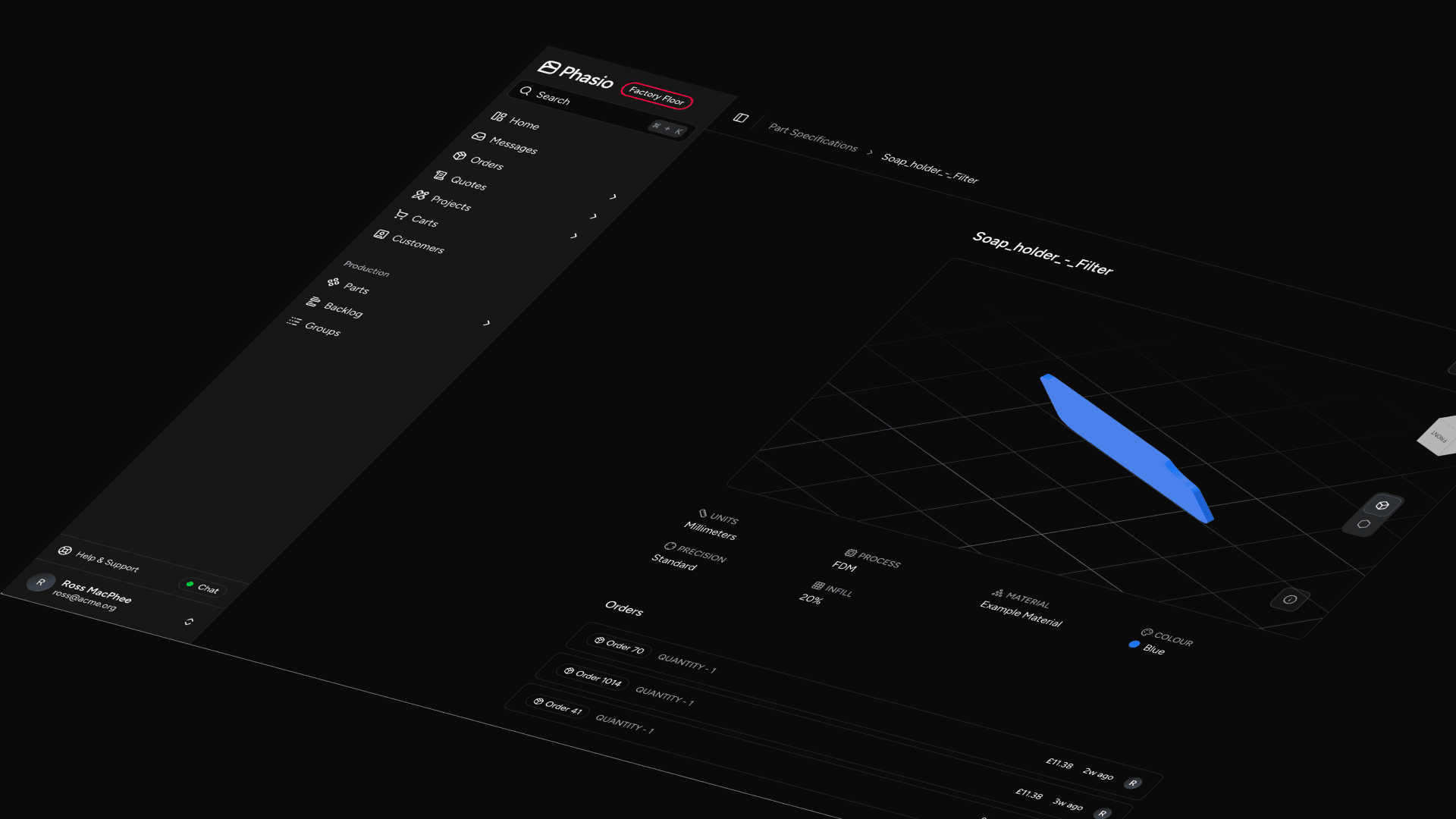
A cleaner Part Specification & a new settings area
The part specification screen has been redesigned, so the model viewer, process, material, precision, and the orders and customers tied to a part are all easy to read at a glance. All of your organisation, finance, and production settings now live in one place too: a new Settings entry in the menu opens a dedicated area with its own navigation, so they are no longer scattered across the app.
Turn Off Automatic Mesh Repair
A new storefront setting lets you skip the automatic mesh repair step on uploaded CAD files. If your shop already supplies clean geometry, analysis runs faster and leaves your files untouched.
Order Emails Now Follow Your Automations
Order confirmation and order-status-update emails are now controlled by the same per-column automations as everything else, instead of separate global on/off toggles. You decide which workflow stages send which emails, so notifications behave consistently across your board.
Move an Order Automatically When Production Starts
You can now add an automation that moves an order into a status of your choice the moment its first work order is created. Your board stays in step with the shop floor without anyone having to drag a card.
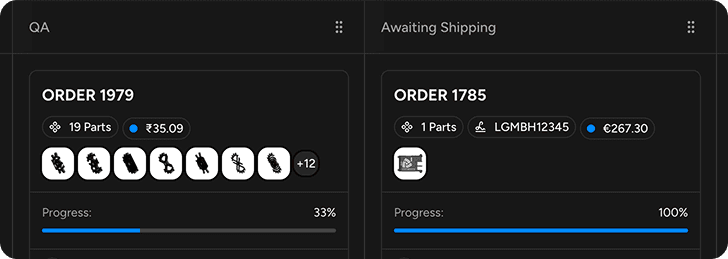
You can also right-click any card on the board to create a work order for that order, straight from the kanban.
Review-Required Pricing Gate
Pricing equations can now flag a quote line for mandatory review before the customer sees a price. When triggered, prices are hidden from the customer storefront and checkout is blocked until you approve the quote. This lets you handle complex or exceptional quotes without breaking the automated quoting flow.
→ How to use review-required pricing
Customer Organisation Metadata
Attach custom key-value metadata to any customer organisation - ERP IDs, Shopify customer IDs, internal reference codes, or any external identifier your workflow requires. Metadata is managed from a dedicated panel in the customer organisation settings and is available via API, including a key-based upsert endpoint designed for integrations with external systems.
→ Manage customer organisation metadata
Subscription Payment Overdue Banner
When your Stripe subscription is past-due or in arrears, the manufacturer dashboard now shows a prominent alert banner with a direct link to the Stripe customer portal to update payment details. Subscription status syncs in real time so the banner always reflects current billing state.
Fixed Build Orientation Constraints
Manufacturers can now set a fixed build orientation constraint on a part directly within the quote configuration UI. An interactive 3D model viewer with rotation controls lets you define the required orientation, which is stored against the part specification and submitted with the requisition.
→ Set a build orientation constraint
Customer Article References on Document Templates
Document templates - invoices, packing slips, and similar - can now include a customer-supplied article reference number for each line item. The template variable selector has also been significantly expanded and reorganised, making it easier to find and insert variables when building custom document templates.
→ Template editor variable reference
Billing Address on Storefront
The customer storefront order detail page now shows the billing address alongside shipping details, giving customers a complete view of the addresses on record for each order.
Swedish Language Support
Swedish (SV) is now a fully supported notification and UI language across all platform services. Swedish-speaking customers can receive order confirmations, invoices, project updates, and all other system notifications in their native language. Add a Swedish template variant from the Templates editor to deliver localised documents alongside notifications.
Per-Operator Cart Numbering
Manufacturers now receive sequential, operator-scoped cart reference numbers. Each new cart gets the next number in your operator's sequence, making carts easy to reference in external systems like ERPs or support tickets. Existing carts have been backfilled with numbers so the full history is covered from day one.
Ukrainian Hryvnia (UAH)
The platform can now price and transact in Ukrainian Hryvnia. Exchange rates are sourced from the National Bank of Ukraine (NBU), with automatic fallback to ECB and IMF providers if the NBU API is unavailable — ensuring rate availability even during provider outages.
Bexio & Comatic Accounting Integrations
Two new accounting platforms are now supported: Bexio and Comatic. Manufacturers can sync orders, contacts, quotes, and invoices bidirectionally with both systems — keeping your accounting platform in step with activity on Phasio without manual data entry.
Quote Converted Webhook
A new quote.converted webhook event fires the moment a customer accepts a quote and it transitions to a confirmed order. The event fires exactly once per order, making it safe to use as a trigger for downstream automation — ERP sync, CRM updates, fulfillment triggers, or any integration that needs to act at the point of conversion.
Full payload schema and setup instructions are available in the Developer portal.
Dynamic Template Headers & Footers
Document templates can now define page headers and footers directly in the template HTML editor using reserved element IDs (id="page-header" and id="page-footer"), with no separate API configuration required. This brings header and footer control fully into the visual and source editors alongside the rest of your template.
See the template editor writing guide for syntax and examples.
Checkout Pricing Summary
The customer checkout page now shows a full pricing breakdown in the order sidebar — line items, shipping, taxes, and total — displayed alongside the payment form. Customers get complete pricing context at the point of payment without needing to navigate back to the review screen.
The configure and review flows have been tightened up with clearer pricing feedback, a refactored calculation engine, and a round of fixes across the storefront, order views, and the similar-parts workflow.
Edit Confirmed Orders
Manufacturers can now edit confirmed orders in-place — adjust parts, quantities, and expenses without voiding and recreating the order. Every price change is recorded as an audit trail entry on the order thread, so there's a complete history of what changed and when.
Custom Order References
Attach a free-text reference code to any order — an internal PO number, an ERP identifier, or any cross-system tracking code your workflow requires. The reference appears in order lists, kanban cards, and webhook payloads, making it easy to tie Phasio orders back to your existing systems.
Webhook Developer Documentation
A new Developer portal section publishes complete webhook event references for all five supported event types. Each event includes a full payload schema, field descriptions, and setup instructions so your team can integrate without guesswork.
3D Part Viewer in Cart & Review
Customers can now view a full 3D model of any part directly from the cart and review screens. Clicking a part thumbnail opens a modal with the interactive viewer and commenting support — no need to navigate away to inspect a part before placing an order.
Cart-state navigation has also been tightened up: empty-cart users are redirected away from the review screen, and users with items in their cart are guided into the configure flow automatically.
Custom Domain Email
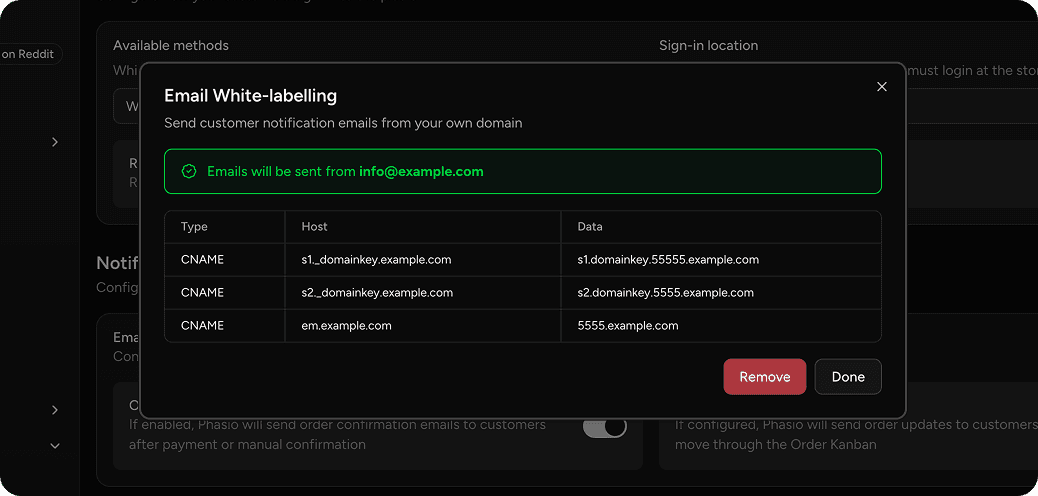
Your platform emails no longer need to come from a generic address. With DNS white-labeling, manufacturers can now authenticate and send all transactional emails quotes, order confirmations, invoices directly from their own domain. This means your customers see emails from orders@yourdomain.com instead of a third-party sender, building trust and reinforcing your brand at every touchpoint.
Setup is straightforward: configure your domain within the platform settings, complete the DNS authentication steps, and all outgoing emails will be routed through your verified domain. The system validates that your sending address matches your authenticated domain to prevent misconfiguration.
Refreshed Email Templates
14 transactional email templates have been redesigned with a modern, consistent layout and enriched data. The following emails now feature the new design:
- Orders: confirmation, creation, acknowledgement, update, tracking, paid, invoice notification, and conversation
- Projects: creation, request creation, conversation, and quote under review
- Account: welcome and one-time password
Order confirmations in particular now include detailed line-item breakdowns, pricing context, and clearer calls to action. Every template is aligned with your workspace branding.
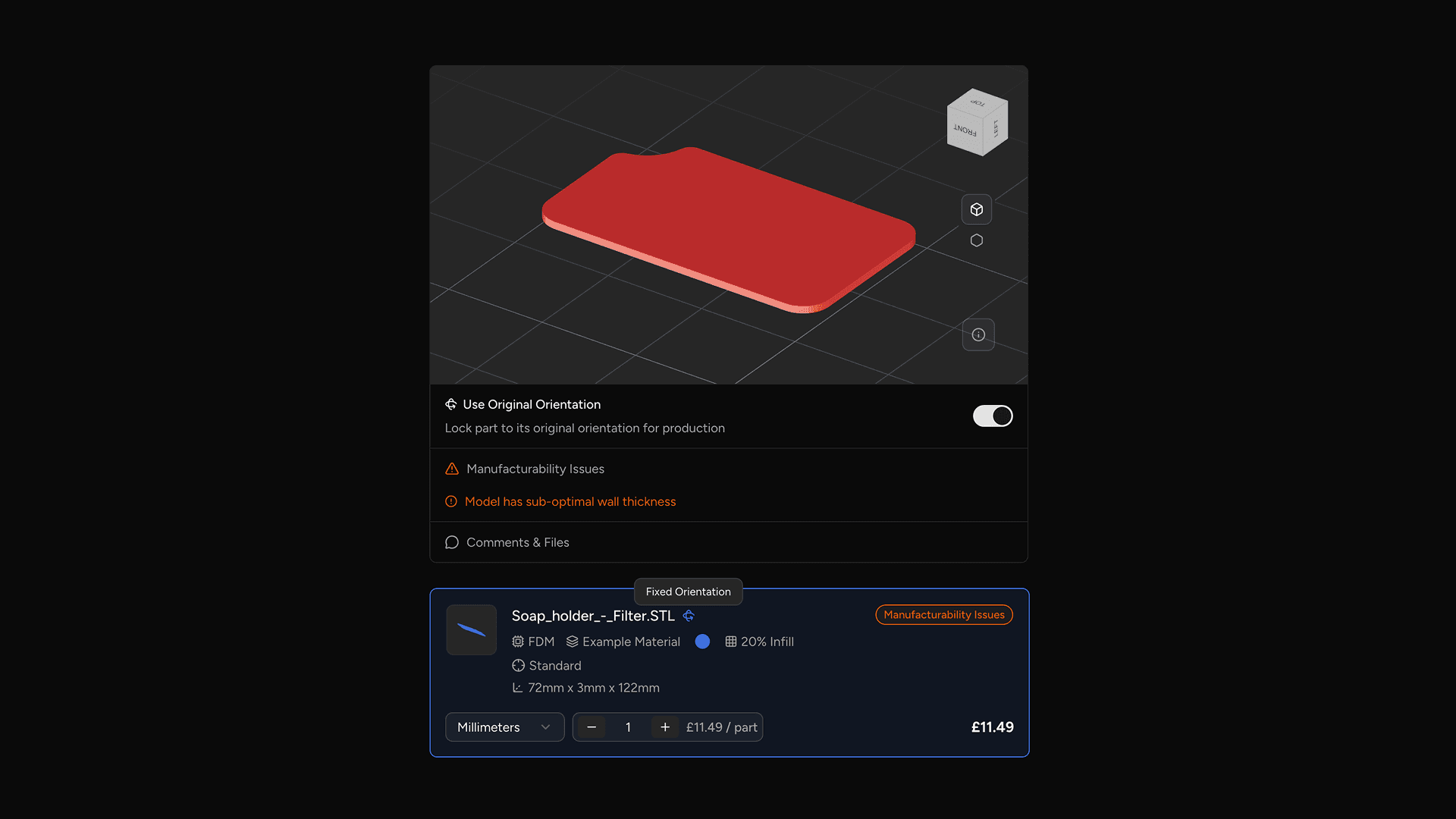
Over the past few weeks, we've been hard at work overhauling the heuristics of manufacturing and purchasability constraints, and we've also revived carts, so customers can now pick up where they left-off quicker than ever.
Manufacturability Issues
Previously, manufacturability issues were only visible inside the model viewer, making them easy to miss. Now, issues are displayed in a dedicated collapsible section alongside the model viewer — separated into errors and warnings — giving you a clear summary without needing to interact with the viewer.
Similarly, we've also improved the language around routing on storefronts. Now, checking out is more contextual, with "Save Quote" being displayed when all parts are purchasable, and "Submit for Review" when manual review is required.
Manufacturing Constraints
Customers can now choose to enforce the original orientation of their uploaded CAD file when a part goes to production.
With this new feature, customers can toggle "Use Original Orientation" to automatically place a constraint on the associated part specification. This constraint instructs nesters to print the part in the orientation of the original CAD file through CAMSPEC.
When a constraint is present on a part, you will now see anywhere that part is visible indicating that a fixed orientation constraint is applied. Similarly, parts will now be oriented in their constraint orientation when displayed through the model viewer.
This feature is opt-in, and only available to Pro and Factory Floor tier manufacturers. It can be enabled through General settings on the manufacturing platform.
Persistent Carts
Your customers' carts are now persistent and tied to their account. When a customer returns to your storefront, their open carts are listed automatically so they can resume exactly where they left off — including all process, material, lead-time, and post-processing selections.
Each cart tracks its full lifecycle from open through to order conversion, so nothing is lost between quoting and checkout. This means fewer abandoned quotes and a smoother path from upload to order for your customers.
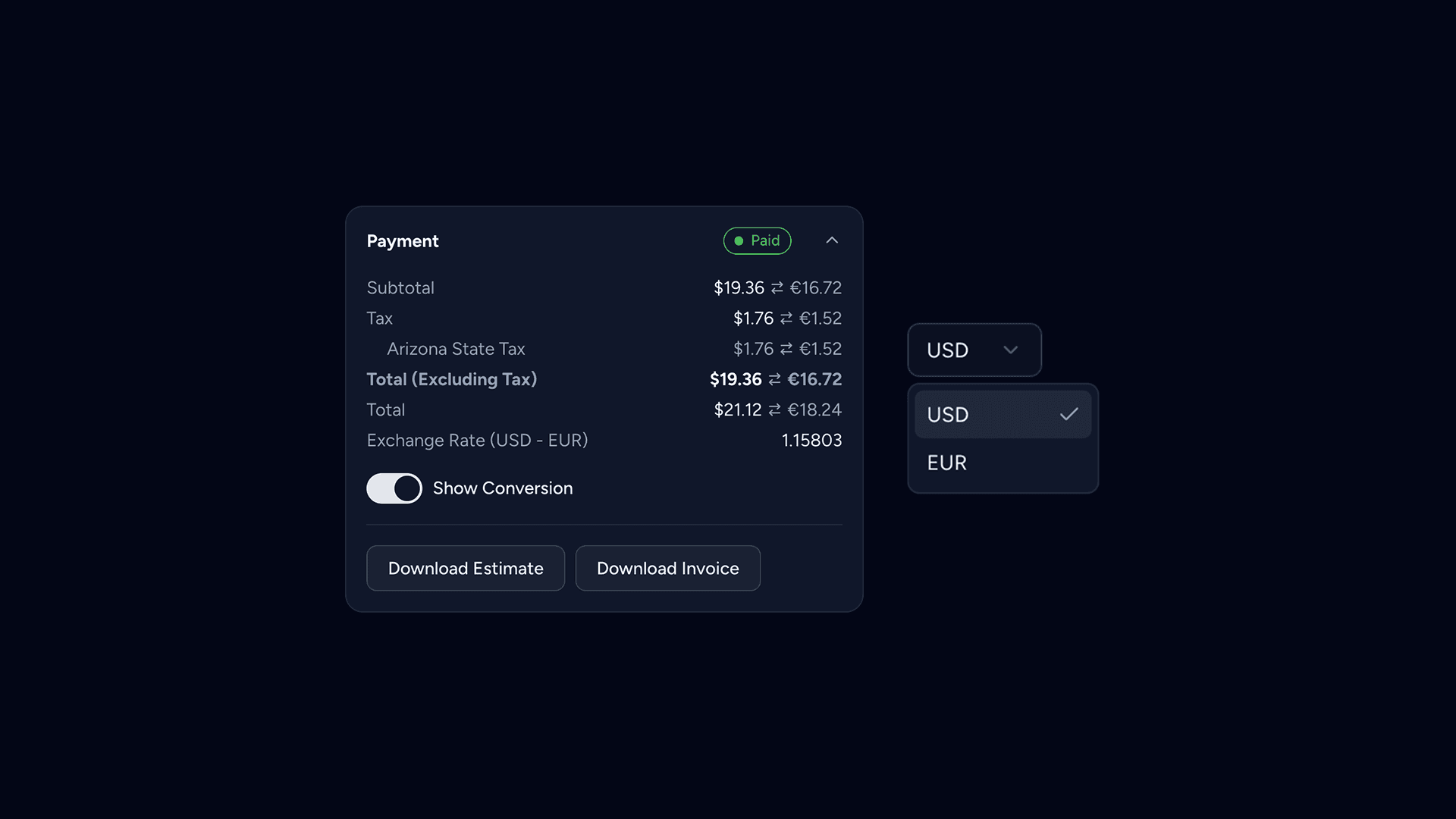
You can now accept international payments for orders and quotes. We will automatically fetch exchange rates from your payment provider where possible, otherwise falling back to live ECB and IMF rates.
These exchange rates are held for up to a day, minimising fluctuations in your customers pricing. We'll also automatically adjust exchange rates, directly offsetting FX and platform fees to ensure you as a manufacturer aren't having to foot the bill.
There are a few caveats and restrictions to multi-currency support, you can read more here.
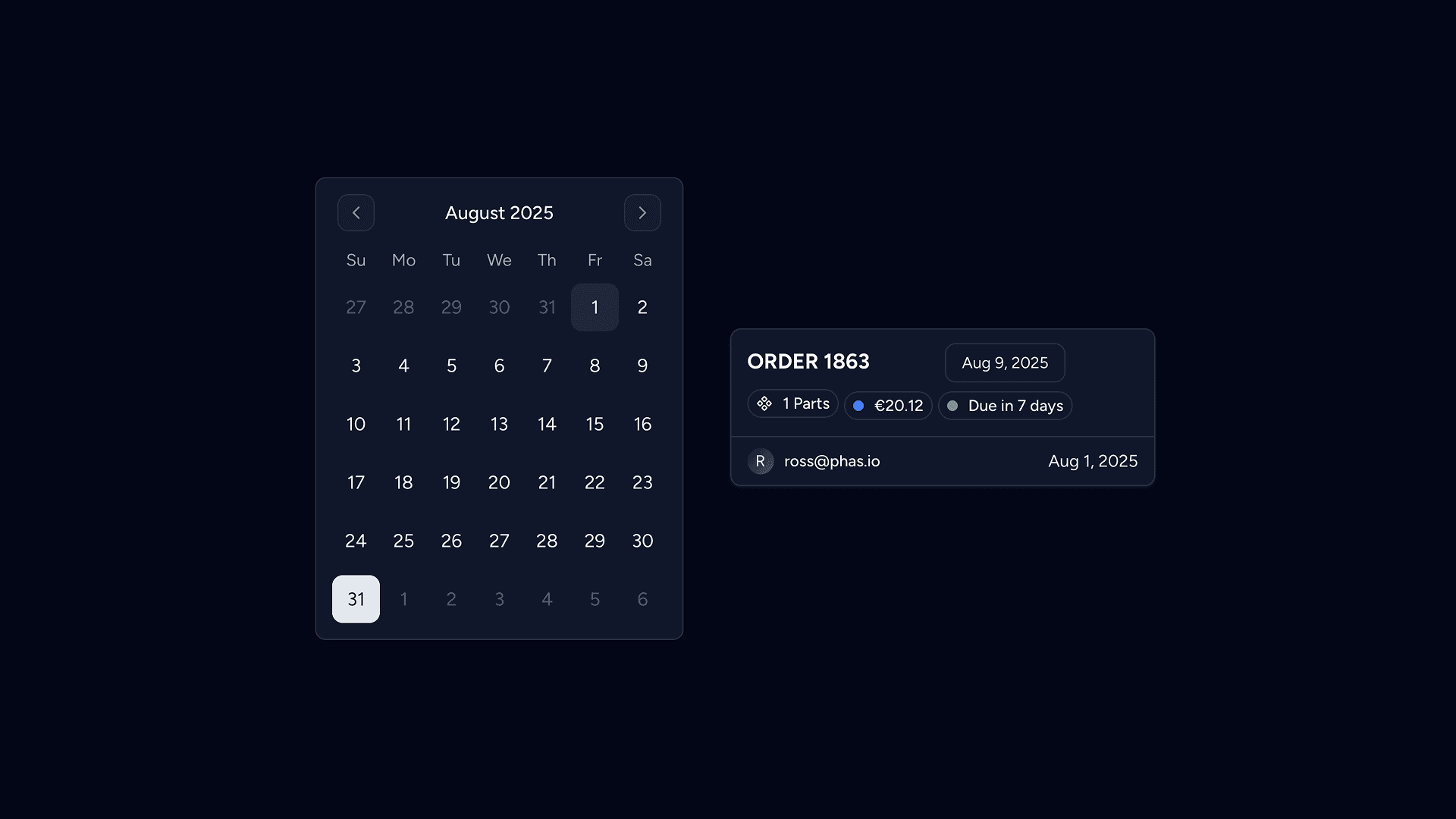
Communication of dispatch dates for part manufacturing is essential. Previously, your dispatch date was derived from a simple lead time mechanism that allowed you to define a duration range (i.e.: 2~3 days).
Lead times are now defined on the workspace level, meaning any lead time you define is available across all of your processes and post-processes. Each lead time is now associated with a buffer / grace-period for use in dispatch date estimation. Lead times are no longer associated with a pricing multiplier.
Our new dispatch date implementation takes a holistic approach to resolving issues surrounding the old system, and is the natural successor to the previous target lead time concept. You can now calculate an estimated duration to fulfil a requisition, known as the manufacturing duration, directly within your process and post-process equations.
The dispatch date is then calculated based on the durations returned from these equations, whilst also applying a general lead time buffer duration on top.
For our factory floor users, you can define durations on each of your workstations, and therefore skip calculating the estimated duration entirely in your equations.
You can read more about the specific details of configuring lead times here, and configuring dispatch dates here.
Part Intelligence
Previously, your parts were disconnected instances in your database but now, your parts have memory.
Know now whether you have seen a part before or not based on part similarity analysis. Apply previously defined manufacturing specifications or search for customer article numbers to create one-click quotes. End the mess of version control within your clients' parts
Parts become persistent, learning assets that build manufacturing knowledge with every order, so you can remember everything about every part you've ever made. No more treating identical uploads as separate parts from quoting to production.
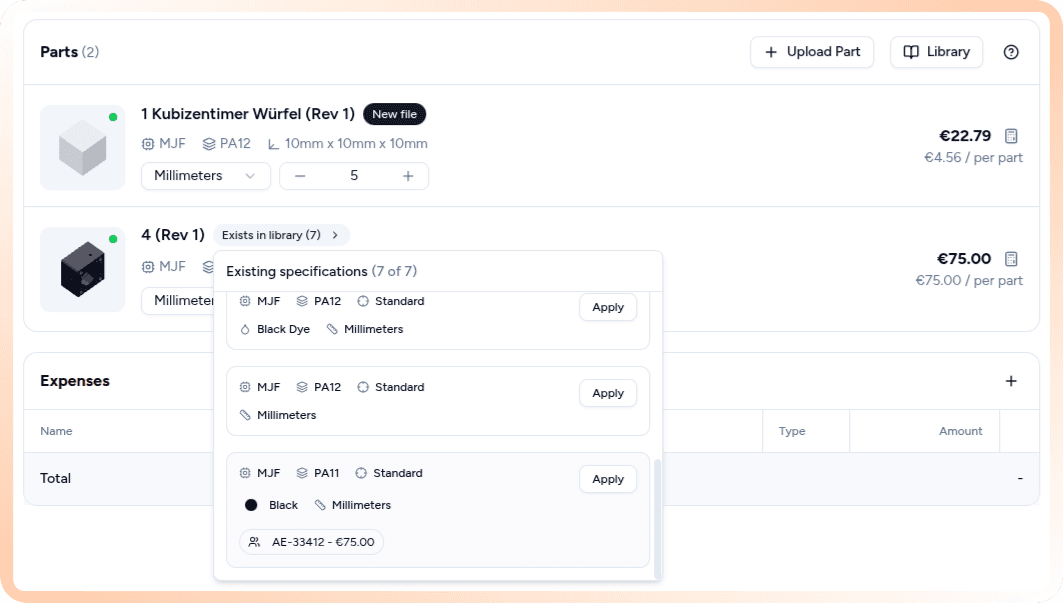
Part Intelligence—Data on its own is useless. Data in the correct context is magic.
CAMSPEC
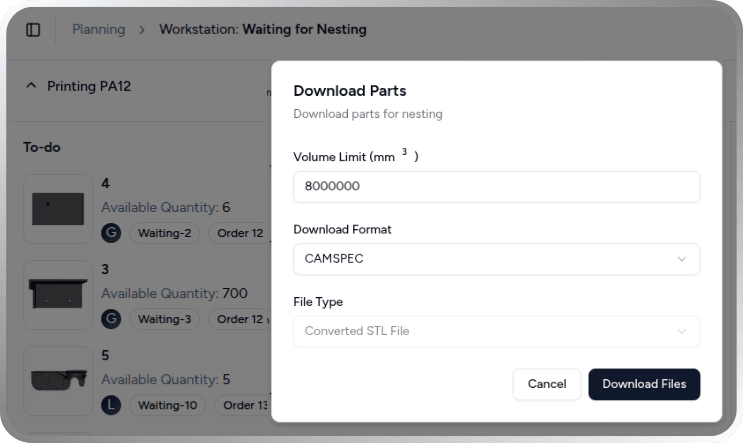
Camspec is an open source file format https://camspec.org invented by Phasio to communicate part manufacturing constraints across different tools such as nesting and slicing software required for manufacturing.
What's new:
- Automatic constraint export to production software
- Fixed orientations and requirements flow seamlessly to Dyndrite, AMISpro, 4D additive and netfabb enabling end-to-end automation from quote to production
Supercharged TypeScript Equations
Pricing that aligns with reality
Pricing equations are now based on the powerful scripting language typescript. The equation builder interface has increased context of the part specification (process, postprocesses, wall thickness analysis)
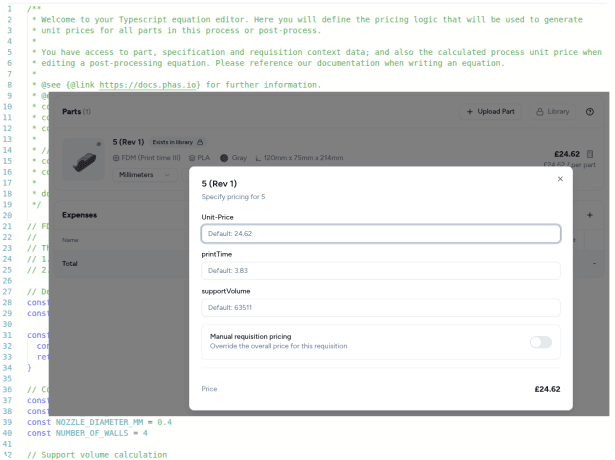
In every equation, you can now define variables that you want to be able to adjust in real-time during quote creation. This allows you to understand how a price was calculated and to make precise adjustments to key aspects of your algorithm. For example, supportVolume (FDM), number of threaded holes (CNC), parts that fit in a build (SLS/MJF).