AI Assistant
Turn on the AI Assistant on your Storefront so customers can get material and technology advice and send you qualified requests, built from your own processes, materials and pricing.
The AI Assistant is a chat assistant on your Storefront that acts as a virtual sales engineer. It guides customers through material and technology selection, answers their questions and turns the conversation into a detailed request for your team, giving customers an alternative way to request a quote. It is especially useful for customers who know what they want but do not have a model file to upload.
The assistant runs on Google Gemini and works from your own process catalog, material options and pricing structures, so its answers are based entirely on your configured manufacturing capabilities. It gives customers 24/7 support for questions about your capabilities, material options, pricing estimates and production specifications, reduces the support workload on your team, and every conversation produces a prequalified lead for your sales team.
Enable the AI Assistant
- Open the user menu at the bottom of the main sidebar, choose Settings, then go to Workspace > General.
- Scroll down to the Features section.
- Turn on the AI Assistant switch. Turn it off to deactivate the assistant.
- Click Save in the page header to apply your changes.
Once enabled, the assistant is immediately available on your Storefront.
Keep your configuration up to date
The assistant only recommends materials and technologies from your own configuration. Before you enable it, check that your processes and materials are complete and correctly described.
How customers reach the AI Assistant
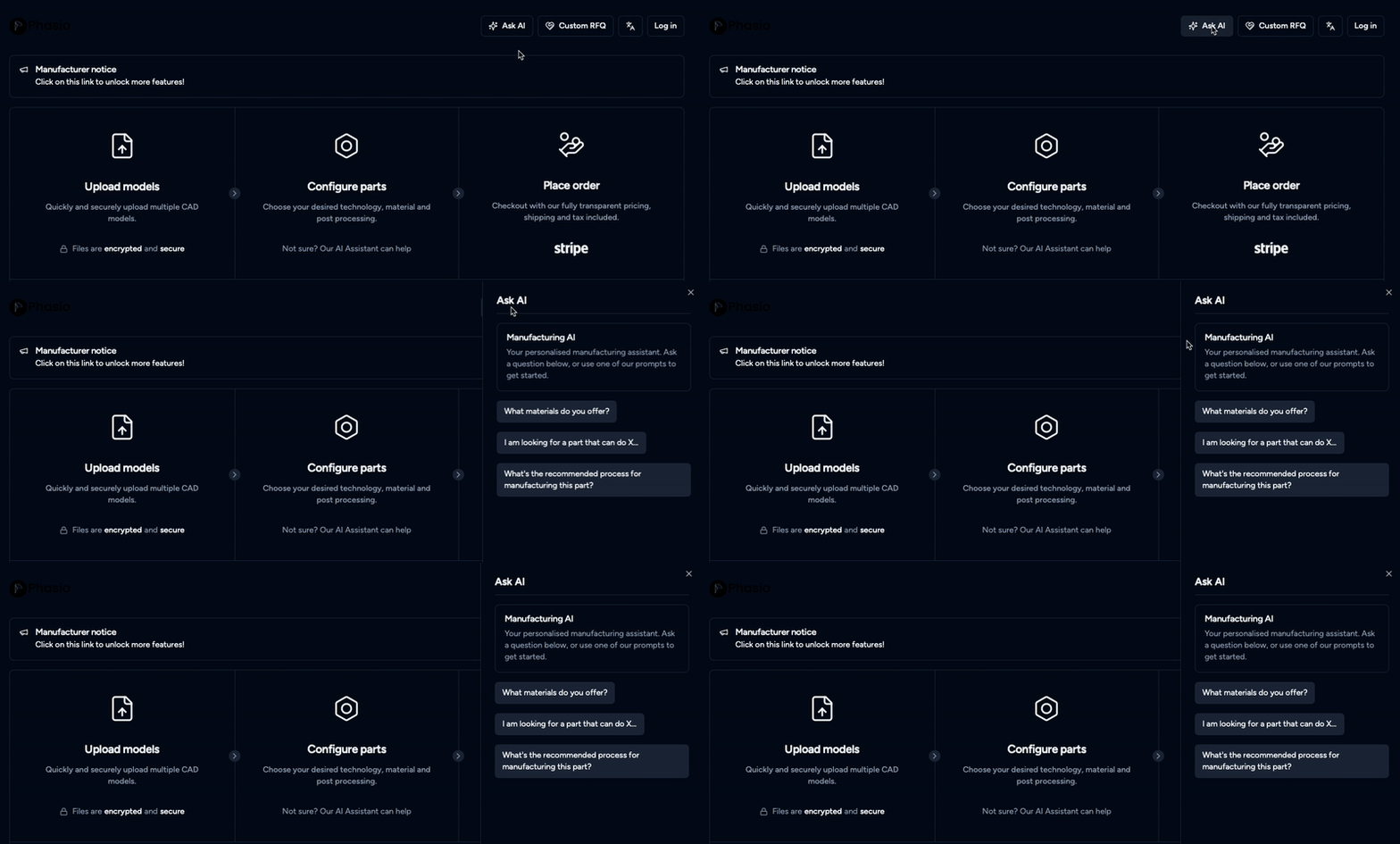
After you enable it, customers click Ask AI (the sparkles icon) in the top menu bar of your Storefront. The assistant opens in a side panel. The button appears only when the AI Assistant is enabled, and there is no separate chat page.
How customers use the AI Assistant
- Chat: The assistant asks targeted questions to understand the customer's needs.
- Upload: Customers can share drawings or reference files.
- Auto-generate request: The assistant creates a detailed custom proposal automatically.
- Review: You receive a complete, prequalified lead as a Proposal under Projects.
- Act: Accept the proposal to turn it into an active project, then create quotes and orders inside it.
What the assistant helps customers do
- Get instant recommendations: Customers receive suggestions on materials and manufacturing technologies, drawn exclusively from your materials and technologies configuration.
- Understand trade-offs: The assistant can explain differences between material options or production methods in plain terms, helping customers make informed choices.
- Navigate without a model file: Even without uploading a part, customers can ask technical or project-specific questions and get relevant guidance.
- Submit requests for out-of-scope needs: If a customer asks about services you don't offer, the assistant prompts them to submit a Custom RFQ, capturing the lead for your team.
- Ask in their own language: The assistant understands and responds in the customer's input language.
What the assistant can configure
Beyond conversation, the assistant can directly update part details while the customer configures their parts:
- Material adjustment: Adjust part materials to better suit the customer's functional needs.
- Quantity changes: Update part counts based on conversational prompts.
- Part awareness: Recognise specific part names and reference them accurately when there are several parts.
What happens to the requests
Each request the assistant creates arrives as a Proposal under Projects. You can chat and exchange files with the customer during the proposal phase. Accept the proposal to turn it into an active project, where you can create quotes and orders. See Projects.
Where the AI Assistant saves you time
The assistant removes common friction points in customer onboarding and quoting:
- Bridge knowledge gaps: Many customers know what they want to do, but not how to make it. The assistant steps in with targeted questions and tailored guidance, helping them choose suitable materials and technologies from your actual capabilities.
- Clarify vague use cases: When a customer describes their application (for example, "heat-resistant casing for outdoor use"), the assistant asks follow-up questions and recommends the best material and technology combination, just like a trained sales engineer.
- Automatically optimise part inputs: As the conversation evolves, the assistant updates materials and part configurations to match performance needs, delivering clearer requests to your team.
For other Storefront settings, see Storefront and Embed your Storefront.
Last updated on
Storefront
Set up your branded Phasio Storefront, where customers upload models, get instant quotes and place orders, and choose how customers sign in.
Embed your Storefront
Embed your Phasio Storefront on your company or affiliate website so customers can request quotes, place orders and pay without leaving your site.